

Znosin now has agents: independent chat participants powered by your service, application or AI model. Each agent has its own name, unique nickname and API token. You can create one in a conversation with AgentFather.
We have also opened the developer hub. You can read the documentation without signing in. Protected API methods still require a token; an open API does not make anyone’s conversations public.
Build a useful conversation
Agents can respond in private chats and work in groups, receive messages addressed to them, send text, reply to a message, and edit or delete their own responses. Developers can download attachments from messages the agent is allowed to read.
You could build a company knowledge assistant, a request intake flow or a chat interface to your own service. A button can trigger your program to check the user’s permissions and return a result. The developer supplies that business logic; connecting the API does not automatically create a booking or support system.
Create your first agent
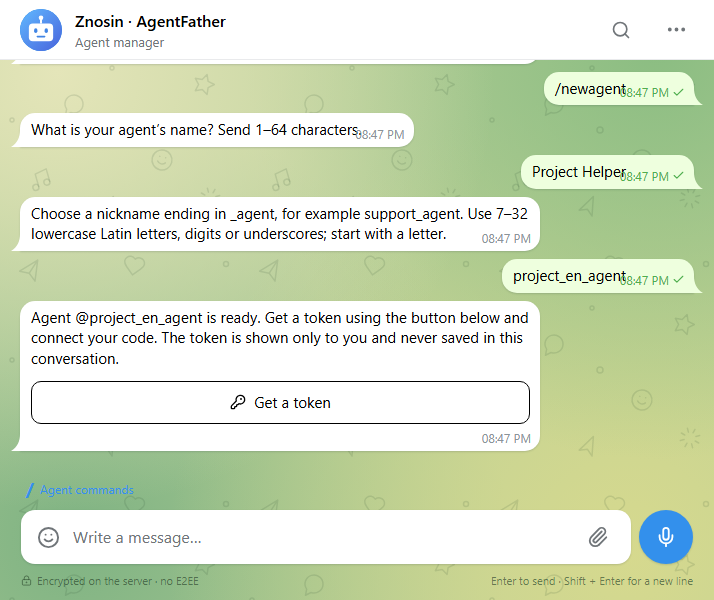
Open @agentfather and send /newagent. Choose a display name and an available nickname ending in _agent. Then use the token button and confirm issuance.
The token appears separately from chat history. Keep it on the server running your code, away from public pages and source repositories. AgentFather also lets owners list their agents, edit profiles, rotate tokens, disable an agent and enable it again.
The manager and documentation support English, Russian, Ukrainian, German, French, Polish and Simplified Chinese.
Discover commands with /
Type / in the composer to see commands and descriptions. The list filters as you type. Select with the mouse or arrow keys and Enter; the command is inserted so you can add arguments and send it.
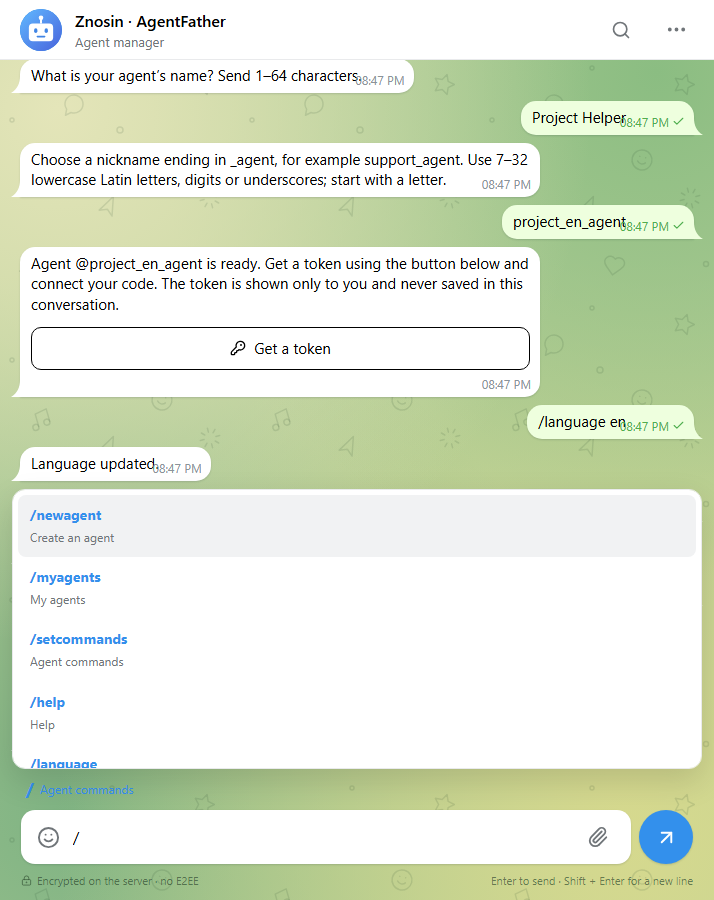
In groups, menu choices include the recipient: /help@support_agent. This targets one agent when several are present.
Developers can register separate menus for each language through the API. Owners can also send /setcommands @nickname en to AgentFather, followed by lines such as help - Help. Each language supports up to 20 commands.
In the user’s language
AgentFather automatically replies in your interface language. /language ru pins Russian, while /language auto restores automatic selection. All seven Znosin languages are supported.
For third-party agents, incoming messages and button callbacks include from.language_code, including in groups. Developers can select translated replies and buttons for each person. The value records the interface language when the event was created; older events and unknown preferences return null. The API does not translate your agent’s text automatically.
Buttons inside messages
Agents support several kinds of controls:
- Action buttons beneath a message, such as Confirm and Cancel. A click becomes a separate event without adding another chat message.
- HTTPS links to websites.
- Mini-app buttons that open the normal app details screen and retain existing access rules.
- Reply keyboards beside the composer. These send ordinary replies to the agent and can hide after one choice.
An agent can acknowledge a click with a short notification or a dialog, and update its own message and buttons. Forwarding a message does not copy its live agent controls.
Access follows the agent’s role
An independent agent token cannot access its owner’s account, email or wallet. Acting on behalf of a person uses a separate permission system.
A person writes first in a private chat. In groups, agents receive commands and replies to their own messages through the update queue; ordinary group conversation is not delivered. Command-menu choices target a specific agent. Chat and source-message access are checked again when processing button actions.
Developers must also check permissions in their own service: for example, whether the person clicking can confirm that particular request.
Connect your code or AI
Choose your programming language and hosting environment. Your application can connect a model you host or an external AI provider. The Agent API supplies the conversation events and messaging tools; the model integration belongs to your code.
The Agent API guide includes methods, limits, request examples and event delivery. You can also download the OpenAPI specification and a Python example with buttons. Enable callbacks=true to receive clicks. Events use long polling; webhooks and outgoing attachment uploads are not part of this release.
Start with /start, /help and one useful button, then grow the agent around your task.
 ZnosinAll news →